Mentions
The mention signals that power Share of Voice, prompt performance, and heatmaps.
What are Mentions?
Mentions are the building blocks of your AI visibility. ucited.ai detects when a brand from your catalogue appears in a natural AI answer, whether it is named directly in the answer text or one of the domains it goes by is referenced. Every such detection contributes to your visibility metrics.
There is no separate Mentions page in the dashboard. You analyze mentions mainly on the Share of Voice page through the heatmap, prompt views, and model comparison.
The Mentions Heatmap
The heatmap shows prompts as rows and time buckets from your selected date range as columns. It helps you see where your brand or competitors are consistently visible and where mentions drop off:
- Dark cells = many mentions
- Light cells = few mentions
- Empty cells = no mentions in that period
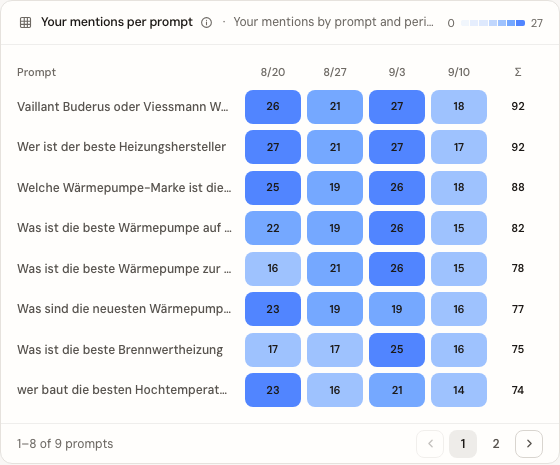
The heatmap follows the date filter at the top of the dashboard. Change date range, models, or prompt filters when you want to isolate a specific topic cluster.
Model and Brand Comparison
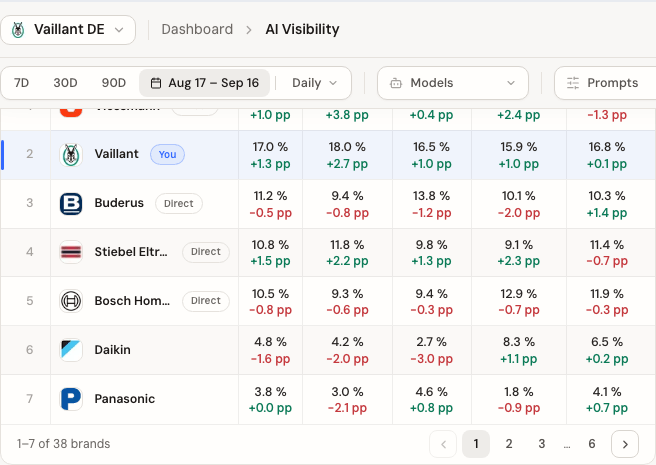
The SOV by AI Model table shows which brands and domains are visible overall and per model. It is not a raw mention log; it gives you the aggregated view of distribution and model differences.
Why do Mentions matter?
Mentions explain why your Share of Voice moves:
- Topic identification: Discover which questions your brand is present for — and which it is not
- Temporal patterns: Identify whether your visibility is consistent or fluctuating
- Content impact: Track how new content affects your mentions on specific prompts
- Competitive observation: See where competitors are strong and where gaps exist for you
How to use this metric
Find prompts and topic clusters where you are consistently visible. Keep those pages fresh and expand them deliberately.
Look for prompts where competitors are mentioned but you are not. This is concrete improvement potential. Use the Citation Gaps report for automated gap analysis.
Review the heatmap and trend regularly. If mentions for an important prompt suddenly drop off, it may indicate content changes, new sources, or model updates.
After a content optimization, review the same date range and filters again. Are mentions increasing for the optimized topic area?
Related pages
Deepen your understanding with these additional metrics and tools: